
Same page, different test results?
Why your test results change even when your page stays the same. Common causes and fixes, plus how to troubleshoot.
Have you ever looked at a performance trend line, sworn that nothing on the page has changed, and still watched your Largest Contentful Paint (or other metric) change by a second or more from one hour to the next?
You're running into one of the most persistent misconceptions in web performance: the idea that browsers behave deterministically. They don't. When you understand why, a lot of "mystery" regressions stop being mysterious.
Common assumption: If the content on my page hasn't changed, the browser should load it the same way every time
It's a completely reasonable thing to believe. It's also wrong.
A browser loading a page isn't executing a fixed script with a guaranteed order of operations. It's making a series of judgment calls, in real time, based on conditions that are different every single time the page loads:
- When did the server start responding to each request?
- Did any packets get lost or delayed along the way?
- How many other requests are competing for the same connection right now?
- Which script happened to finish downloading a few milliseconds before another one?
None of that is under your control, and none of it is guaranteed to play out the same way twice. So when your content is identical but your LCP time bounces between three and four seconds throughout the day, the content isn't the variable. The browser's moment-to-moment decisions are.
The most common cause: Asking the browser to guess
There's one pattern that causes this kind of instability more than anything else: declaring multiple versions of your hero image (or banner) in the HTML, then using CSS to hide the ones that shouldn't display.
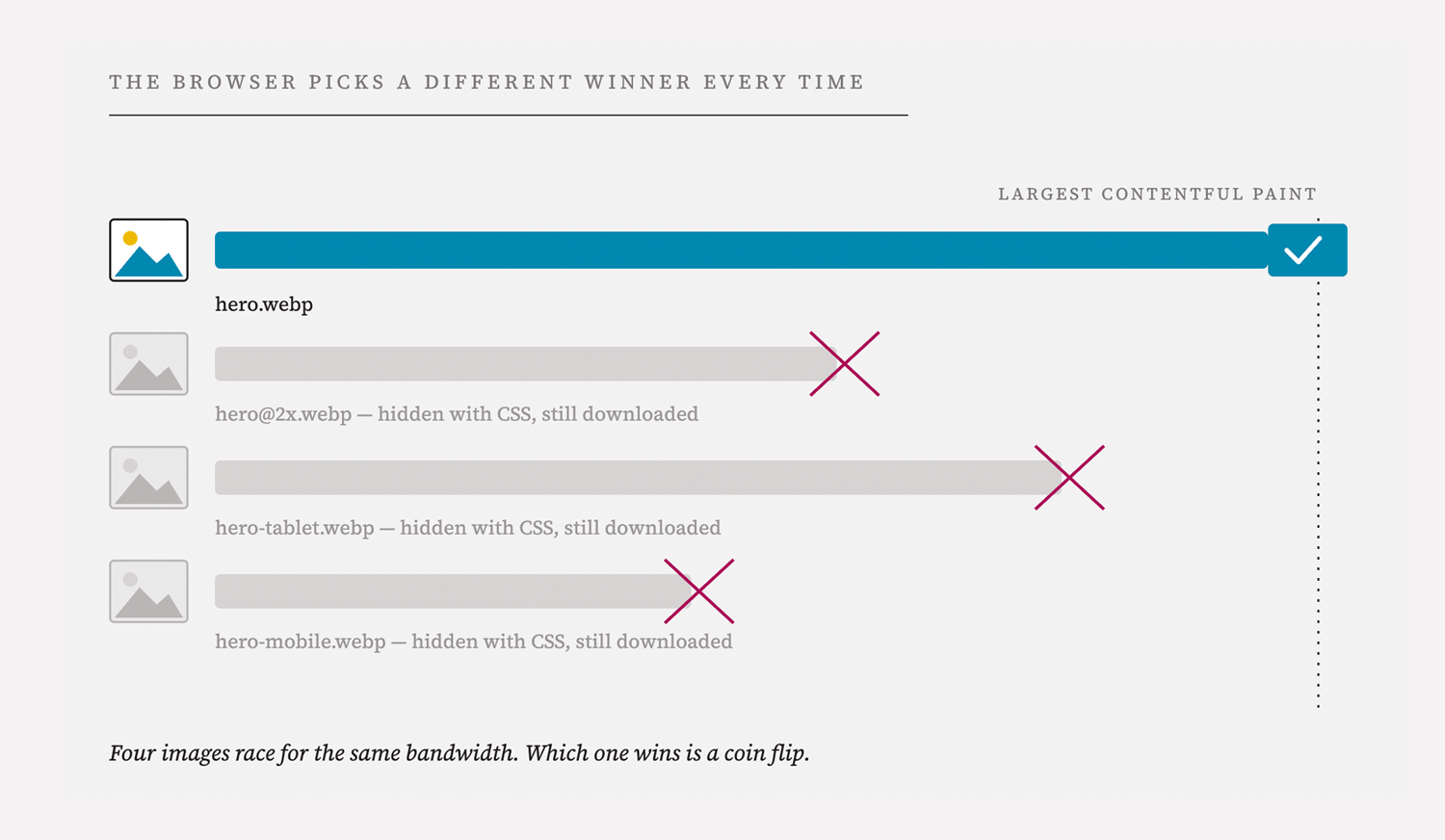
Think about what that actually asks the browser to do. It sees four tags. CSS is a rendering concern: it has nothing to do with what the browser decides to fetch. So the browser dutifully downloads all four images, in parallel, with no information about which one actually matters.
Which image wins the race and shows up first is essentially a coin toss. It depends on:
- The order the images appear in the markup
- How quickly the server responds to each individual request
- Whether any of those requests hit network congestion on the way to the browser
Sometimes the real LCP image happens to arrive early, and your test looks great. But sometimes the image is stuck behind three other images competing for the same connection, and LCP increases. Same page and same content, but very different outcomes. That's because the browser is making a different call each time about which request to prioritize.
The fix
The fix is a <picture> element with a media attribute on each <source> so the browser knows before it fetches anything which single image it actually needs for the current viewport. No guessing, no wasted downloads competing for bandwidth, no race condition.
This is not new advice. The "don't load four images and hide three of them with CSS" guidance has been standard practice for well over a decade. But it's worth restating because it's the single highest-leverage fix for exactly this kind of unstable-LCP pattern.
The HTML markup should be similar to this:
<picture>
<source srcset="large-image.jpg" media="(min-width: 75em)">
<source srcset="medium-image.jpg" media="(min-width: 40em)">
<img src="small-image.jpg" alt="Description of the image"
fetchpriority="high">
</picture>
The browser will choose the large image on wide viewports, the medium one for medium size viewports and fall back to the smaller one if none of the media queries match. Adding fetchpriority=”high” to the fallback images ensures the browser will download the chosen image as a high priority.
MDN has a comprehensive guide to the variety of use cases that picture can fill >>
"But the CPU and network graphs look inconsistent, too"
This is where it's easy to go down the wrong path. If you look at a slow test and a fast test side by side, you'll often see CPU usage spike at slightly different times, or bandwidth utilization plateau at a different point. It's tempting to treat that as the root cause: "the CPU is maxing out, that must be why LCP is slow."
Flip that reasoning around. In most cases, the CPU and bandwidth patterns aren't the cause of the instability – they're a symptom of it. If your page is asking the browser to download several megabytes of images, scripts, and third-party tags all at once, of course bandwidth is going to hit 100%. Of course CPU is going to spike while all of that gets decoded and executed. That's just what a network-constrained page load looks like.
The reason those graphs look slightly different from one test to the next isn't a bug in the measurement. It's the same non-determinism showing up one layer down. Slightly different arrival times for competing requests shift when scripts execute, which shifts when CPU spikes happen, which shifts the bandwidth curve. It's the same root cause rippling through every metric you look at.
That's also why chasing CPU or bandwidth graphs as a diagnostic tool usually leads nowhere. Until the request pattern itself is stable – until the browser isn't fetching four images when it only needs one – comparing CPU traces between two tests is comparing two different sets of random noise.
"Why did this get worse on a specific date, with no deploys?"
This question generates the most escalations. "Nothing changed on our end, so why did the trend shift on this particular day?"
A few things can cause a step change in variability without a content deploy:
- A shift in image size or count. Even a change from, say, a 123KB image to a set of four smaller images can increase the total request count and shift which request ends up "winning" the race for LCP. More competing requests generally means more variability, not less – even if the total payload looks similar or smaller on paper.
- Third-party and infrastructure changes. Anything that changes where your test traffic originates, or how it routes, can shift timing just enough to expose instability that was already baked into the page. This isn't the cause of the underlying issue – the same instability exists across regions and across real user traffic – but it can be the thing that makes an existing problem newly visible.
- Aggregation hides the problem, then un-hides it. In real user monitoring, you're looking at millions of sessions blended together. Individual instability can get smoothed out in the aggregate for a while and then become more visible as traffic patterns shift. The underlying cause doesn't have to change for the visible symptom to change.
More often than not, the instability was always there. The markup pattern that causes it doesn't become more broken on a given date, but small shifts in traffic, routing, or asset composition can be enough to tip an already-fragile setup from "mostly consistent" to "visibly erratic."
How to troubleshoot
If you're seeing unexplained variability in your LCP (or other rendering metrics), here's a practical order of operations:
- Check the markup for the LCP element first. Before anything else, look at whether multiple versions of the hero image or banner are declared in the HTML and hidden with CSS. This is the most common root cause, by a wide margin.
- Compare waterfalls from a fast test and a slow test, side by side. Look specifically at which image request the browser identified as the LCP candidate in each one. If it's a different request each time, that confirms the race-condition pattern rather than a genuine performance regression.
- Resist the urge to diagnose from CPU and bandwidth graphs alone. They'll look different between any two tests on a page like this, and that's expected, not a separate bug to chase.
- Look at trend data over weeks, not just day to day. A single bad day can be traffic or infrastructure noise. A widening, increasingly erratic band over time points more strongly at a structural markup issue.
- Fix the request pattern, then re-evaluate. Move to a
<picture>element with propermediaconditions for every responsive image in the critical rendering path – not just the LCP image, but any other element using the same "four versions, hide three with CSS" pattern. Once the browser can make a deterministic choice about what to fetch, you have a stable baseline to actually diagnose anything else against.
Takeaway: Consistency in your test results is not something you get for free just because your content is unchanged
Consistency is something you have to build into the page, by giving the browser clear, unambiguous instructions about what to prioritize.
Until that's true, comparing any two test runs – or trying to explain why today looks different from last Tuesday – is a bit like trying to explain why two rolls of the same dice came up different numbers. The dice didn't change. The outcome was never guaranteed to be the same in the first place.
Updated 3 months ago